
Getting Started
Welcome to @signkit/core. This guide covers core concepts and how the toolkit fits together.
Core Concepts
Templates
A template defines the structure of a PDF form. It contains:
- List of pages with dimensions
- List of fields (position, size, type, validation rules)
- Metadata (title, version, locale settings, etc.)
Templates are JSON easy to store, version, and share.
Fields
Each field has:
id: Unique identifiertype:text,name,email,date,current_date,checkbox,signature,initialspage: Which page (0-indexed)x,y,width,height: Position and size (normalized 0-1, relative to page)label: Display namerequired,readonly: Constraintsvalidation: Optional validation rules (e.g.,maxLength)meta: Custom metadata preserved as-is
The Three Phases
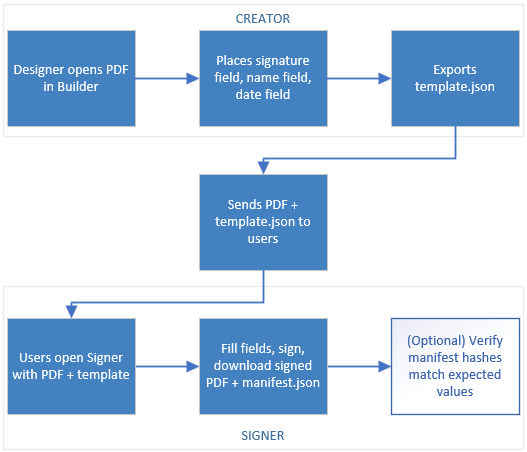
1. Form Builder (Design)
- User loads a PDF
- Drags fields onto pages
- Configures field properties
- Exports a Template JSON
2. PDF Signer (Sign)
- Load the PDF and template
- Users fill fields (type text, draw signatures, pick dates, etc.)
- Export a Signed PDF and Manifest JSON
3. Integrity Check (Verify, Optional)
- Compute SHA-256 hashes of PDF and template
- Compare against expected hashes to verify no tampering
- Pure local verification no server needed
Workflow Example
Key Design Decisions
Client-First, No Server Required
Everything works offline. Upload, signing, and PDF generation happen in the browser using:
pdfjs-distfor renderingpdf-libfor PDF manipulation- Web Crypto API for hashing
Backend-Agnostic JSON Schema
Templates and manifests are plain JSON. You decide:
- Where to store them (database, file system, S3, etc.)
- How to distribute them (API, direct download, etc.)
- How to persist user signatures (if at all)
Optional Integrity Checks
Local SHA-256 hashing lets you detect tampering. This is not cryptographic proof just a local sanity check. For legally binding signatures, integrate with a server-side PKI solution.